Programme coordination
Overall control — assigning, monitoring critical issues, declaring eligibility, producing reports.
management platform
A platform for coordinating the internships of a degree programme — explicit states, a territorial map, cohort calendars and weekly reports.
A degree programme that trains teachers manages hundreds of internships every year, across the schools of an entire region and beyond. Each case involves at least three people — the coordinator, the host tutor, the trainee — and runs through a months-long cycle of documents, hours to log and a final evaluation.
Coordination needed an overview that generic tools could not give. Where are seats available? Who has not started yet? Which documents are missing? Who is at school today? These are daily operational questions, and every answer used to require manual digging.
Overall control — assigning, monitoring critical issues, declaring eligibility, producing reports.
Confirming starts and completions, checking hours and logbooks, with minimal effort.
Knowing where to go, tracking their path, declaring when their hours are done.
Study of the real process with the people coordinating it — normal cases, exceptions, documents and out-of-sequence steps.
The case journey was formalised as a state machine with actions and responsibilities per role.
An interface designed around operational questions ("who is at school today?", "where are seats missing?"), not around database tables.
Full-stack development, a demo environment with synthetic data for training and testing, deployment and maintenance.
The platform is organised into modules, each answering one precise operational question.
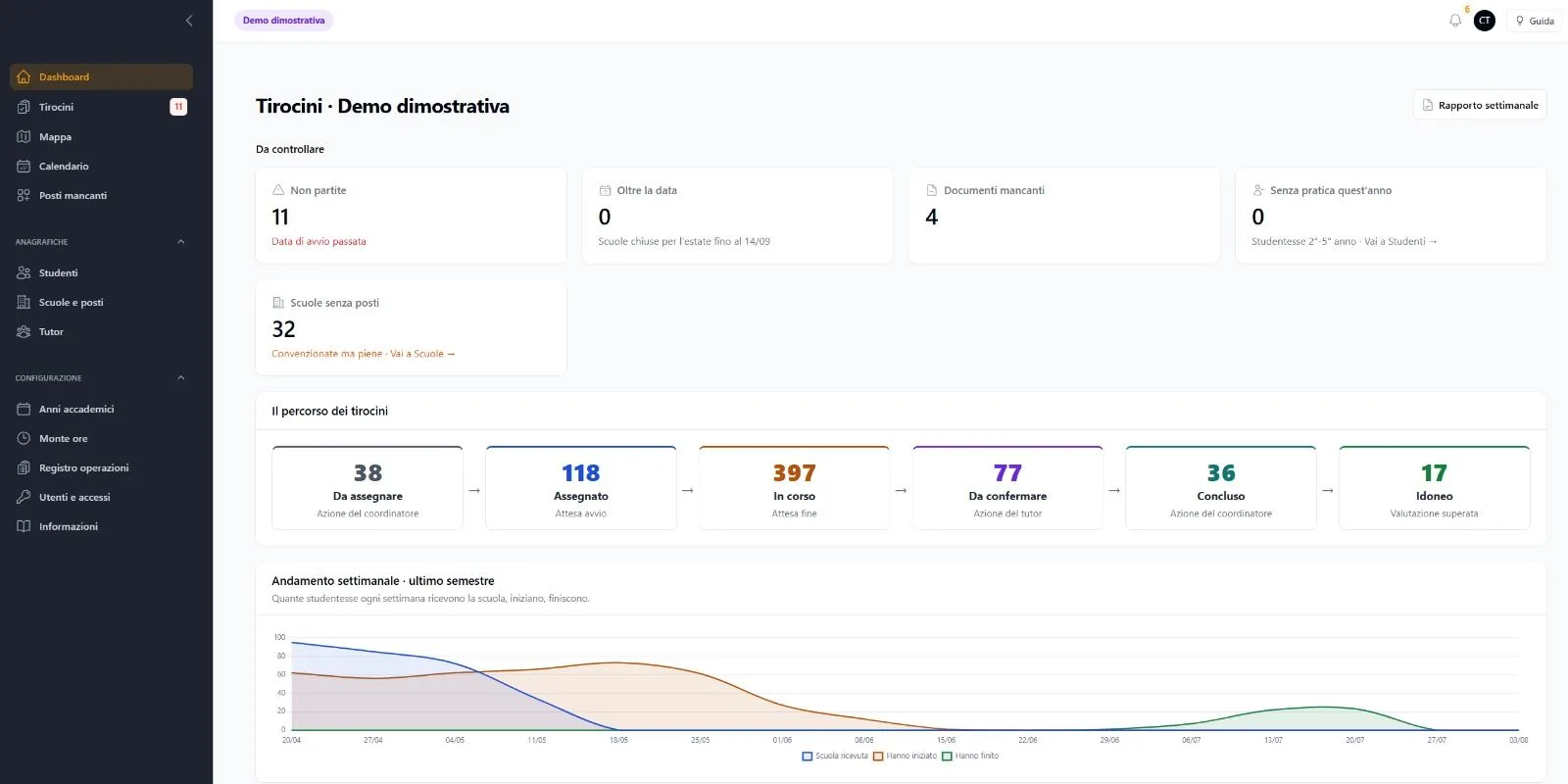
Critical issues up front — not started, past due, missing documents, schools with no seats — plus the overall pipeline of cases.
The list of cases with state, filters and role-aware actions.
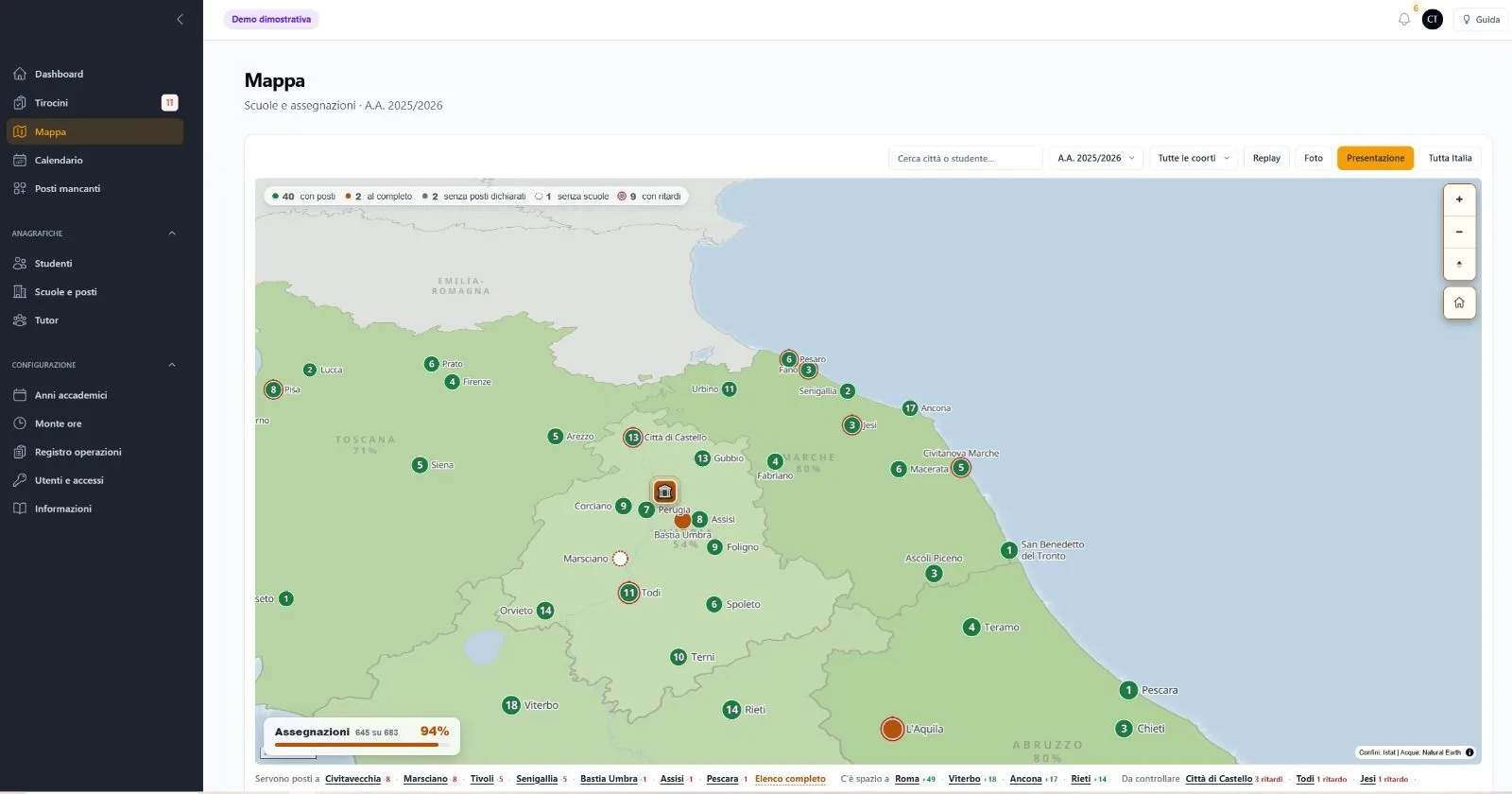
Schools and assignments across the territory — capacities, full sites, delays, search by city or student.
Daily and weekly presence by cohort — who is at school today, in which institutes, at which times.
Where new agreements or extra seats are needed, before it becomes urgent.
Students, schools and seats, tutors — with case history.
Academic years, hour requirements, users and access, operations log.
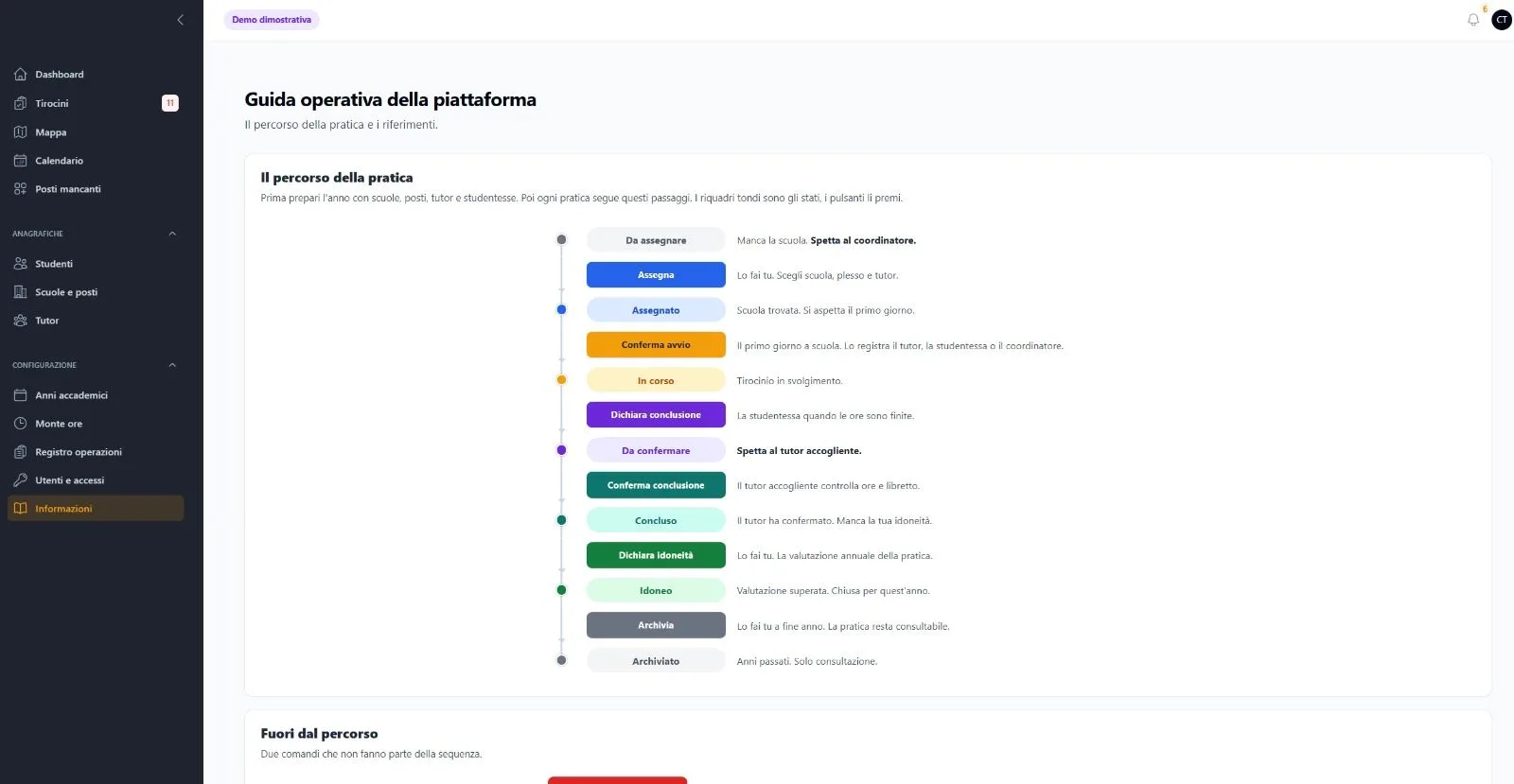
Every internship moves through explicit states. Every transition has a clear owner — the coordinator, the tutor or the trainee — and the platform always shows whose move is next.
No school yet. Assignment is up to the coordination team.
School, site and tutor chosen. Waiting for the first day.
The start is confirmed by tutor, trainee or coordinator. The internship is running.
Hours are done and completion is declared. Verification is up to the host tutor.
The tutor has checked hours and logbook and confirmed completion.
The yearly evaluation is passed; the case closes for this year.
Past years remain browsable, outside the operational flow.
Out-of-sequence actions exist too — cancelling or moving a case back — treated as explicit exceptions, not hidden shortcuts.
The dashboard opens with what needs attention, not with a list of everything.
Assignment percentage, full sites, cities needing seats — geography becomes a working tool.
Weekly and daily views with filters by year of study and state.
A concise summary ready to share with the degree programme.
Every relevant action is tracked — who did what, when.
The manual lives inside the platform, with the case journey explained visually.
Coloured state badges are the platform's lingua franca — the same words in dashboard, lists, calendar and guide. No implicit states.
Every transition says explicitly whose move it is ("Up to the host tutor."), cutting email and ambiguity.
Views answer real operational questions — "who is here today", "where are seats missing" — instead of exposing the data structure.
The guide is not a separate PDF — it is a section of the platform, always in sync with the real flow.
Challenge. The real process is full of exceptions — cancelled cases, second thoughts, special situations.
Solution. The state machine explicitly models out-of-sequence actions, instead of leaving them to users' creativity.
Challenge. Territorial scale — dozens of sites with different capacities — made assignment a puzzle.
Solution. The map with capacities, full sites and uncovered cities turns the puzzle into a view with evident priorities.
Challenge. Three roles with very different digital habits had to use the same tool.
Solution. An essential interface, few actions with explicit names, and a built-in visual guide.
The images on this page come from the demo environment with synthetic data.
Tell me about it: the first orientation call is free of obligations.