andrei calapod

operations + ai ecosystem

From a message on site to a published post

An ecosystem for an exhibition-design studio — field requests become tickets and tasks; one editorial flow becomes content for website and social channels, with AI and a person's final approval.

Client
Italian exhibition design and production studio · described anonymously
Period
In production · continuously evolving
Role
Full product — analysis, UX/UI, full-stack development, AI integration, deployment and maintenance
Stack
  • Python (API) · JavaScript
  • Telegram integration (bot)
  • Voice transcription and AI for multi-channel content
  • Document signing with personal links
  • Docker · Caddy · Linux
Destinations screen of the platform — for one piece of content, toggles select the website journal and portfolio, LinkedIn, Facebook, Instagram and Stories; the summary bar says it will be published in six places.
fig. 01 Write once, choose where to publish — website and social channels from one editorial flow. Anonymised data.

Context

A studio that designs and produces exhibitions — shows, spaces, events — lives between the workshop and the construction site. Operational requests are born there, in front of a wall to finish — a photo, a thirty-second voice note, a technical document photographed on the fly.

Somewhere on the way to the office, something always got lost. Meanwhile communication — website, social channels, portfolio — remained the postponed task, because it meant redoing the same work six times, once per channel.

The project was born to join the two worlds in a single ecosystem — the public website, the internal digital studio and a direct channel from the field.

The problem

  • Operational requests scattered across personal chats, voice notes and photos, with no owner and no deadline.
  • Complex quotations — bills of quantities with items, measures and amounts — managed with generic tools.
  • Documents, suppliers, purchases and job orders without a single archive linked to the work.
  • Publishing a project on website and social channels meant six versions of the same content — so it often did not happen.

Users and goals

People on site and in the workshop

Reporting things as they come — a photo, a voice note — without learning any management software.

Office and coordination

Seeing every request as a ticket with materials, deadlines and assignments; governing tasks, quotations and documents.

Whoever curates communication

Going from finished project to published content quickly, keeping the studio's voice.

  • No field request lost — everything becomes a tracked ticket.
  • Structured quotations and bills of quantities, with numbering, measures and professional print options.
  • One editorial flow for six destinations, with realistic previews before publishing.
  • AI accelerates; people decide — always.

The process

  1. Field analysis

    Observing how requests are actually born — on site, by voice, with both hands busy.

  2. Ecosystem architecture

    Three connected surfaces — public website, internal studio, Telegram bot — on a single base of data and access control.

  3. Iterative development

    Modules released in sequence — board and tasks, then tools (CRM, quotations, documents, purchases, sales, invoices), then the multi-channel editorial flow.

  4. Operation and evolution

    The platform grows with the studio — new needs become modules, without breaking what exists.

Architecture and modules

Three surfaces, one system — the field channel (Telegram), the Studio with its board and tools, and the multi-channel editorial flow feeding website and social channels.

Board and tickets

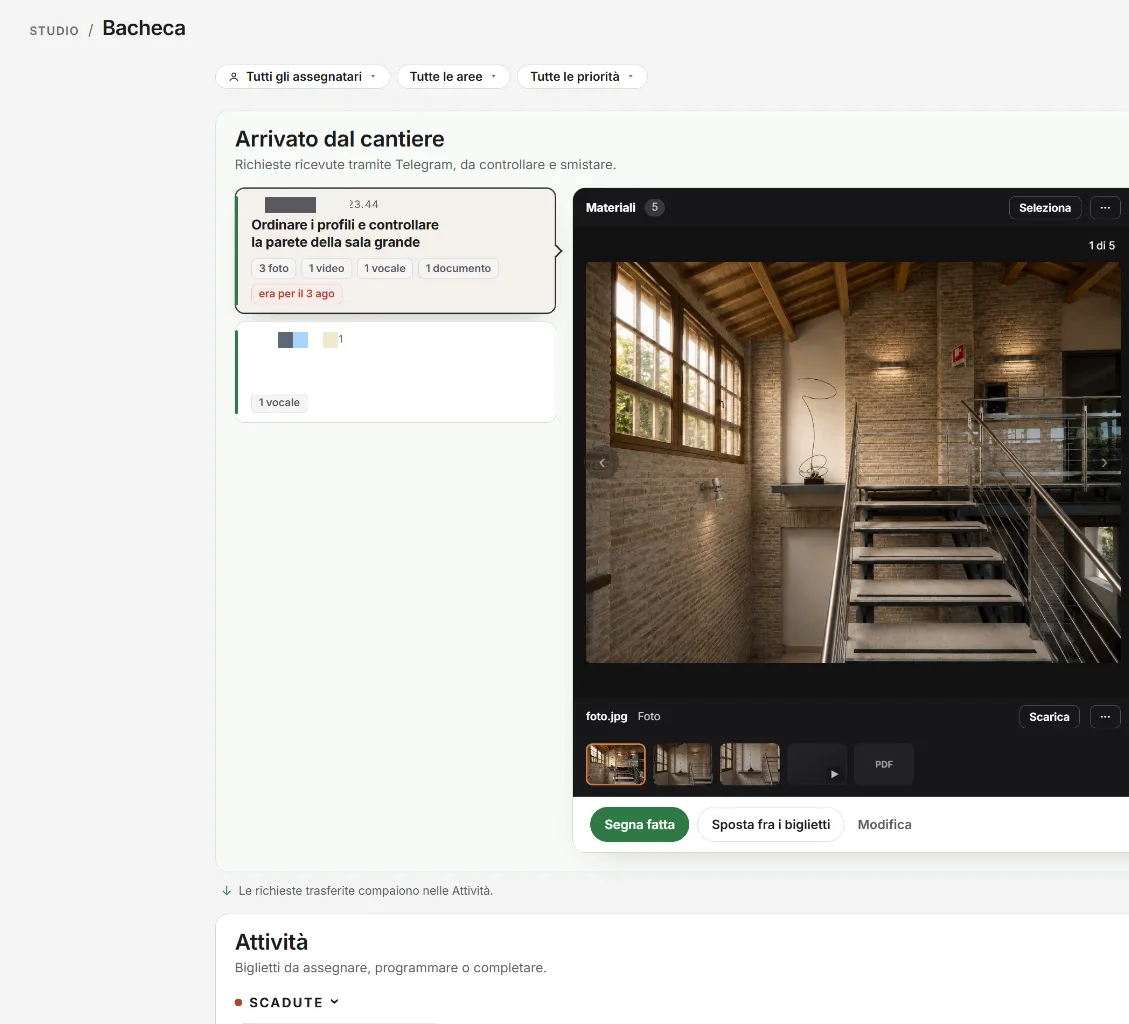
Field requests arrive as tickets with photos, videos, voice notes and documents, to be turned into tasks.

Tasks and calendar

Assignments with deadlines, priorities and areas — what is late surfaces on its own.

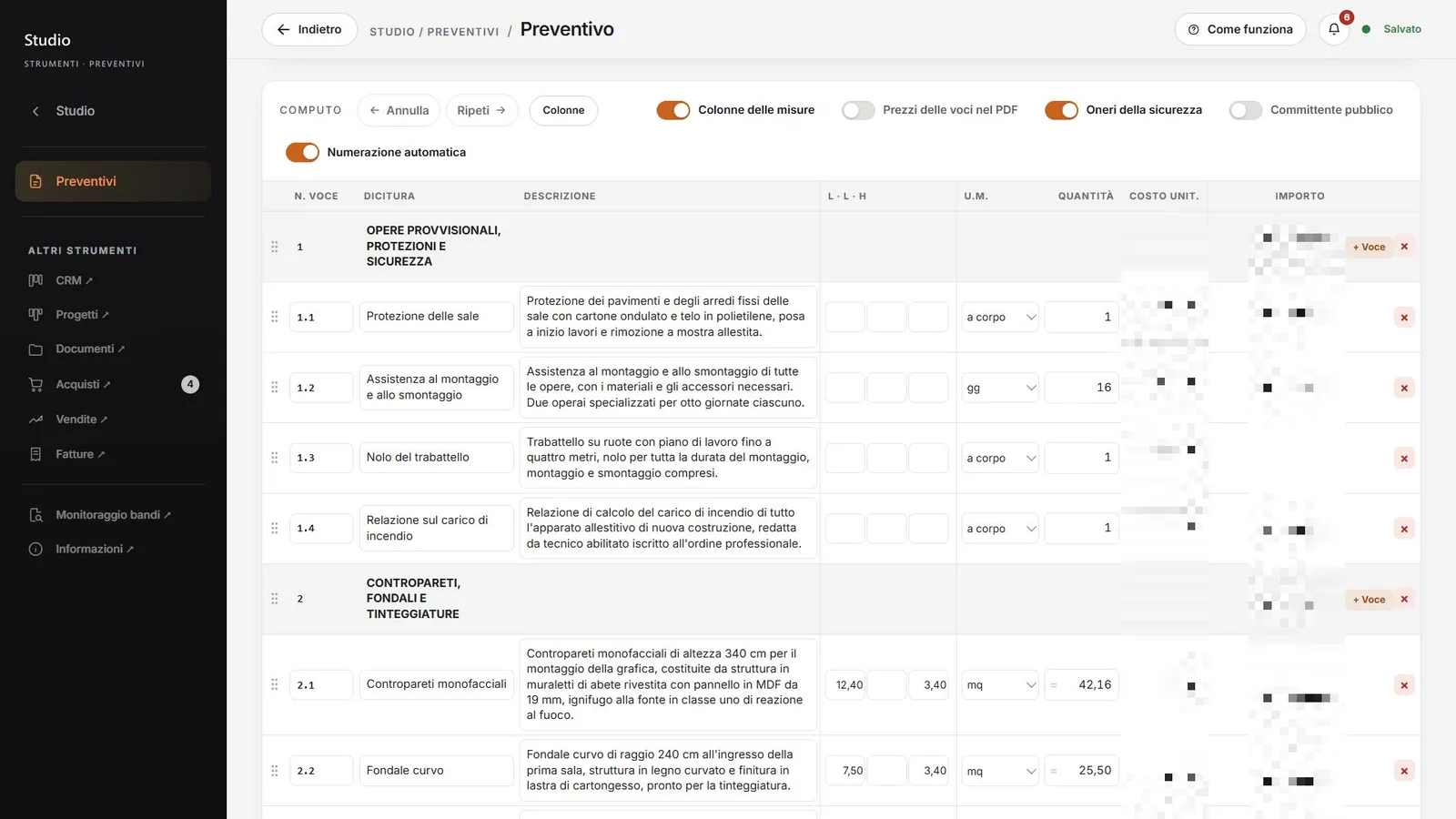
Quotations and bills of quantities

Offers structured by items and chapters, with measures, amounts, automatic numbering and PDF options.

CRM, documents, purchases, sales, invoices

The administrative tools linked to projects, in a single archive.

Document signing

Sending documents with a personal link and a dedicated signing page for the recipient.

Multi-channel editorial flow

One piece of content, six destinations — website journal and portfolio, LinkedIn, Facebook, Instagram and Stories.

The key flow

From the field to the ticket

The most important flow is the shortest one — whoever is on site should do nothing different from what they would do in a chat.

  1. Message from the field

    Photo, video, voice note, document or dictated text — sent to the studio's Telegram bot.

  2. Transcription automatic

    Voice notes become text; materials stay attached to the request.

  3. Ticket office

    The request appears on the board — "Arrived from the site" — with all materials, and a confirmation goes back to the sender.

  4. Task coordination

    The ticket becomes an assigned task, with deadline and priority.

The bot replies with a readable confirmation ("The office will find…") — whoever writes from the site knows immediately that the request has landed.

Write once, publish everywhere

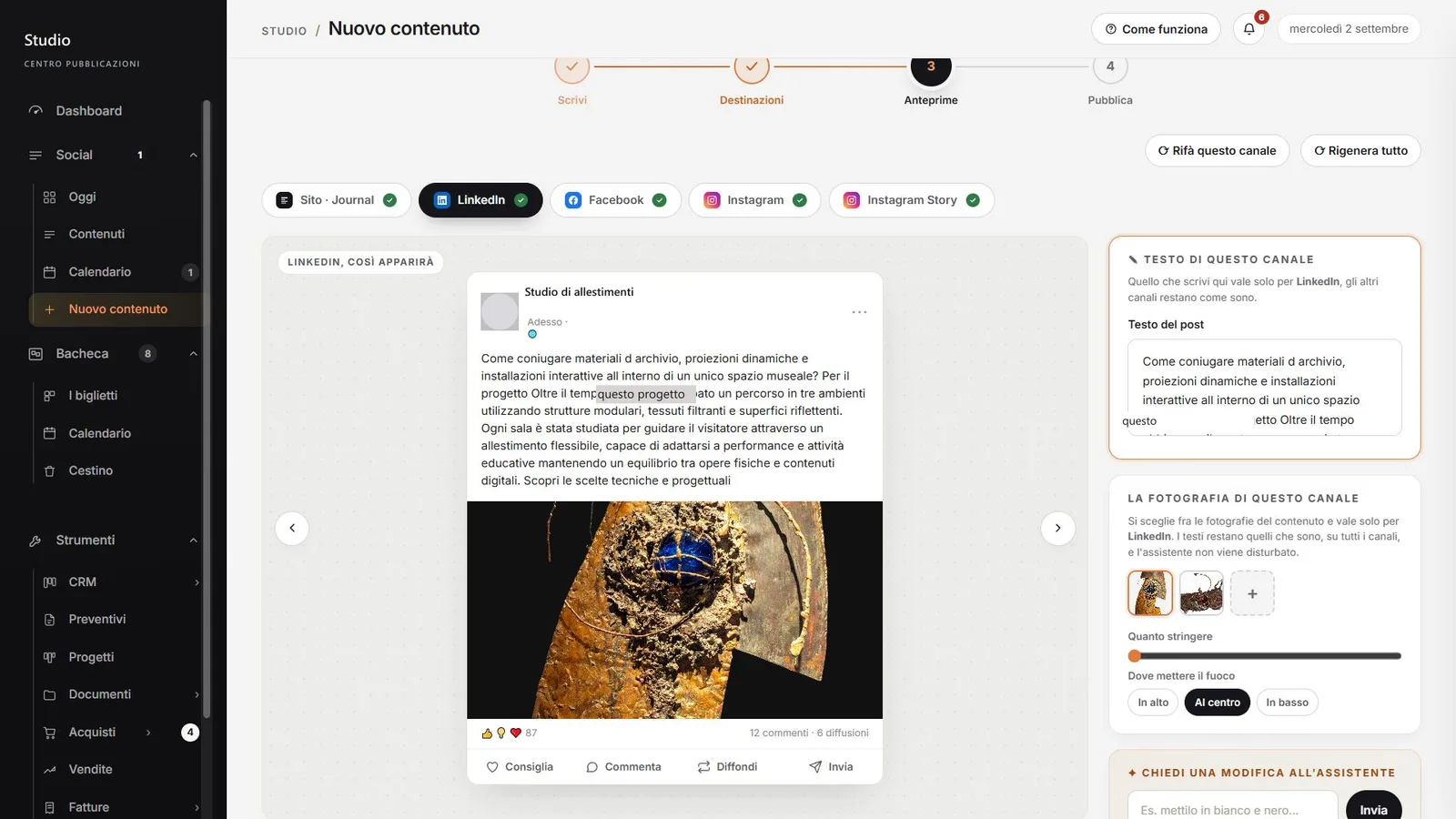
The editorial flow is a four-step path, with AI preparing per-channel versions and a person approving.

  1. Write once

    Title, story, tone of voice (elegant, professional, warm, direct) and images.

  2. Destinations

    Website journal and portfolio, LinkedIn, Facebook, Instagram, Stories — with toggles and a summary.

  3. Previews ai + person

    AI adapts text and format to each channel; the preview shows the real result — phone included.

  4. Publish human approval

    Final approval and coordinated publishing to the selected channels.

Studio board with the "Arrived from the site" queue — a selected ticket shows three photos, a video, a voice note and a document, with the materials viewer open.
fig. 02 The board — a site request with photos, video, voice note and document. Anonymised data.

Main features

Tickets with everything inside

Photos, videos, voice notes with a player, documents and transcriptions — the request arrives complete, not to be reconstructed.

Professional bills of quantities

Items and chapters with measures, units, amounts and automatic numbering; options for prices in the PDF, safety charges and public clients.

Tone of voice

The studio's voice is an explicit choice, not an accident — four defined tones for the editorial flow.

Per-channel previews

A Story is judged on a phone, a post in its own format — before publishing, not after.

Per-channel photography

For each destination you choose framing, crop and focal point of the images.

Built-in guides

Every section has its own "How it works" — the tool explains itself.

Preview of an Instagram Story on a phone rendered inside the platform, with the per-channel text fields on the side.
fig. 03 The per-channel preview — a Story is judged on a phone, before publishing. Anonymised data.

UX decisions

The field uses no management software

For people on site the interface is Telegram — zero training, zero forgotten passwords, zero friction.

The language of the physical world

Requests are "tickets" pinned to a board, with confirmations written the way a person would say them — the software adopts the studio's metaphors, not the other way round.

The preview is the truth

No blind publishing — each channel shows exactly how the content will appear, phone included.

AI proposes, people dispose

Every generated text remains editable and nothing goes out without explicit approval — the last button is always human.

First step of the editorial flow — title, story, tone-of-voice choice among elegant, professional, warm and direct, and image upload.
fig. 04 The editorial flow — one text, tone of voice as an explicit choice. Anonymised data.

Security and privacy

  • Access control on every private route of the Studio, with centralised verification.
  • The public signing page exposes no data — security lies in the personal link and dedicated APIs.
  • Client and supplier data confined to the internal tools.
  • No automatic publishing — final approval always belongs to a person.
  • The images on this page are anonymised (names, references and data redacted).

Challenges and solutions

Challenge. Voice notes dictated on site arrive with noise, typos and broken sentences.

Solution. Transcription is a declared starting point — the text stays editable and the office confirms before it becomes a task.

Challenge. Six channels with different formats and tones risked fragmenting the studio's identity.

Solution. Explicit tone of voice, per-channel rules and real previews — consistency is built into the flow, not left to memory.

Challenge. An ecosystem growing for years must not break with every new module.

Solution. Independent modules on a shared base of data and access control, released and tested one at a time.

Outcomes

  • Field requests land in one place, complete with materials, and become tracked tasks.
  • Quotations and bills of quantities are produced on the platform, with structured PDF documents.
  • Website and social publishing starts from a single editorial flow with real previews and human approval.
  • The ecosystem is in production and keeps growing module by module.

The images come from the real system, anonymised — names, references and recognisable data are redacted.

Possible evolutions

  • Direct link between field tickets and supplier orders.
  • Channel metrics in the editorial flow (what works, where).
  • Extension of the signing flow to more document types.

Does this process sound familiar?

Tell me about it: the first orientation call is free of obligations.